Step 3: Create the simple service definition
In this step, you'll create a service definition that routes your client's requests to the eth0.me IP checker via
your remote router. The definition specifies which identities can dial in, which can host the traffic, and where traffic exits.
-
Create a new simple service and name it a name what-is-my-ip.
-
Fill in the fields:
importantDo not include the protocol (e.g.,
https://orhttp://) when entering the service's Hostname/IP in the intercept configuration. Enter only the DNS name or the IP address, likeapp-server.testor10.0.0.5.Service details:
- Service name: Enter a unique, user-friendly name for the service. Use what-is-my-ip.
- Select or create service attributes: Assign the attribute
#what-is-my-ip.
Accessing configuration:
-
What identities can access this service? (dial policy): Add
#get-started-client, the attribute added to the client identity earlier. -
How will the service be accessed?: Ensure SDK Only is set to No. Enter the Hostname/IP and Port that the client will use when connecting to this service.
NetFoundry allows for flexible naming schemes. The hostname you enter doesn't need to be a legitimate, fully qualified domain name. Instead, with a NetFoundry service, you can pick any address you want. The address can be legitimate, but it also can be entirely fictional. Here, we'll use
what-is-my-ip.netfoundryand port443. You'll notice this domain name doesn't exist and will only be available to identities that are authorized to connect to this service, effectively giving you an infinite number of addresses to use.noteFor maximum security, we recommend using a reserved top-level domain (TLD) from RFC 2606 for your intercept address to guarantee it will never conflict with an actual public internet domain. Reserved TLDs include
.test,.example,.invalid, and.localhost.
Hosting configuration:
-
What identities can host this service? Add
#get-started-host, the attribute added to the router identity earlier. -
Where should traffic be sent?: Ensure SDK Only is set to No. Select the Protocol (e.g., TCP). Enter
eth0.mefor the Hostname/IP and443for the Port.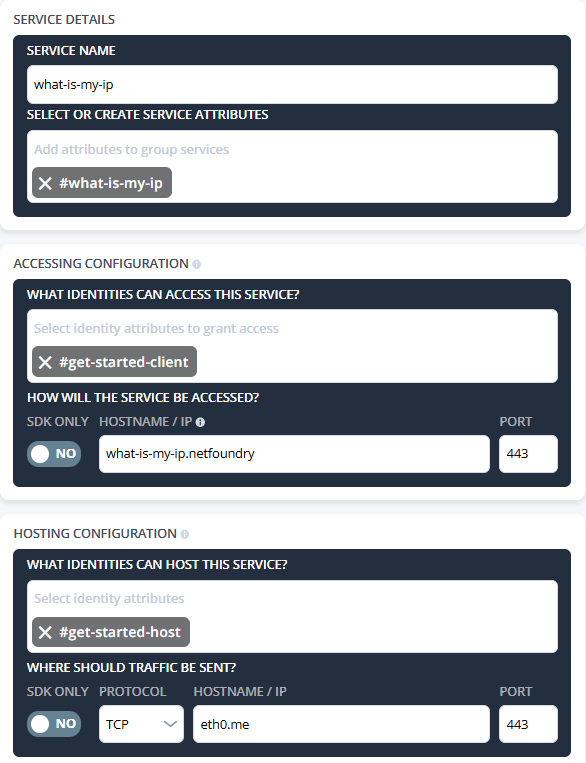
-
Click Save.
Saving the simple service automatically creates the necessary policies (Dial and Bind) and configurations (intercept and host) required for the end-to-end tunnel.
-
Review the execution summary, then click Done.